I Left Eight Agents Working. The First Line When I Came Back Said What Needs Me.

The moment I was designing for
You leave eight agents working and go to lunch. You come back. What do you want to see?
Not eight status lines. Not a scroll of tool calls. You want one sentence, at the top, that says either “Nothing needs you.” or “Needs you:” and a short numbered list, with a link beside each item that takes you straight to it.
That is what the uBixShepherd console does now. I’ve been building toward it since I introduced Shepherd, and the web UI in 0.2 got me most of the way: a thread, a backlog rail, a page I could leave open. But it was still a page that showed me state. I had to read the state and work out what it meant. v0.5.0-beta.1 is the beta where the console does that reading for me.
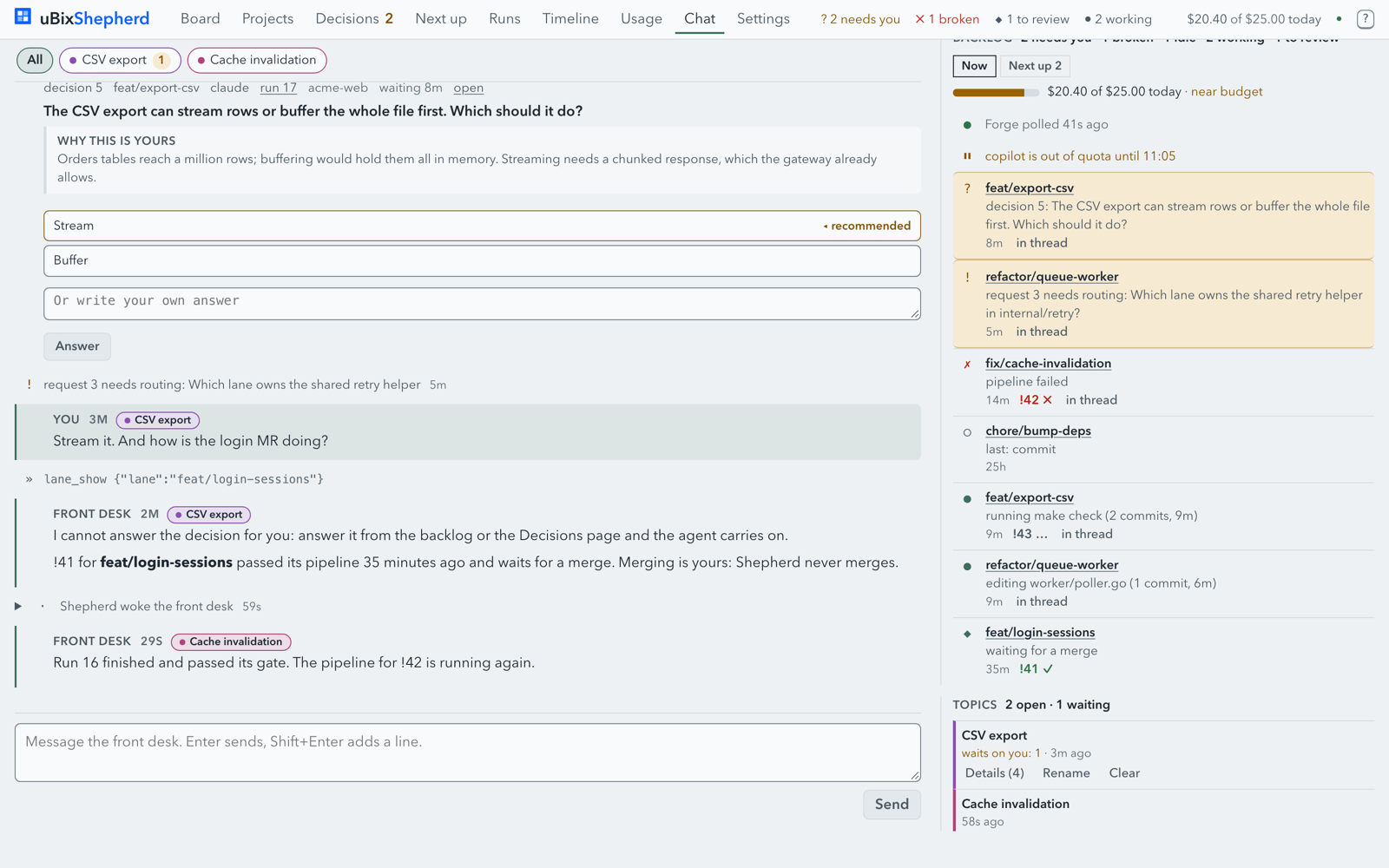
Here is the 0.4 chat page, for comparison:
And here is what I see now when I come back:
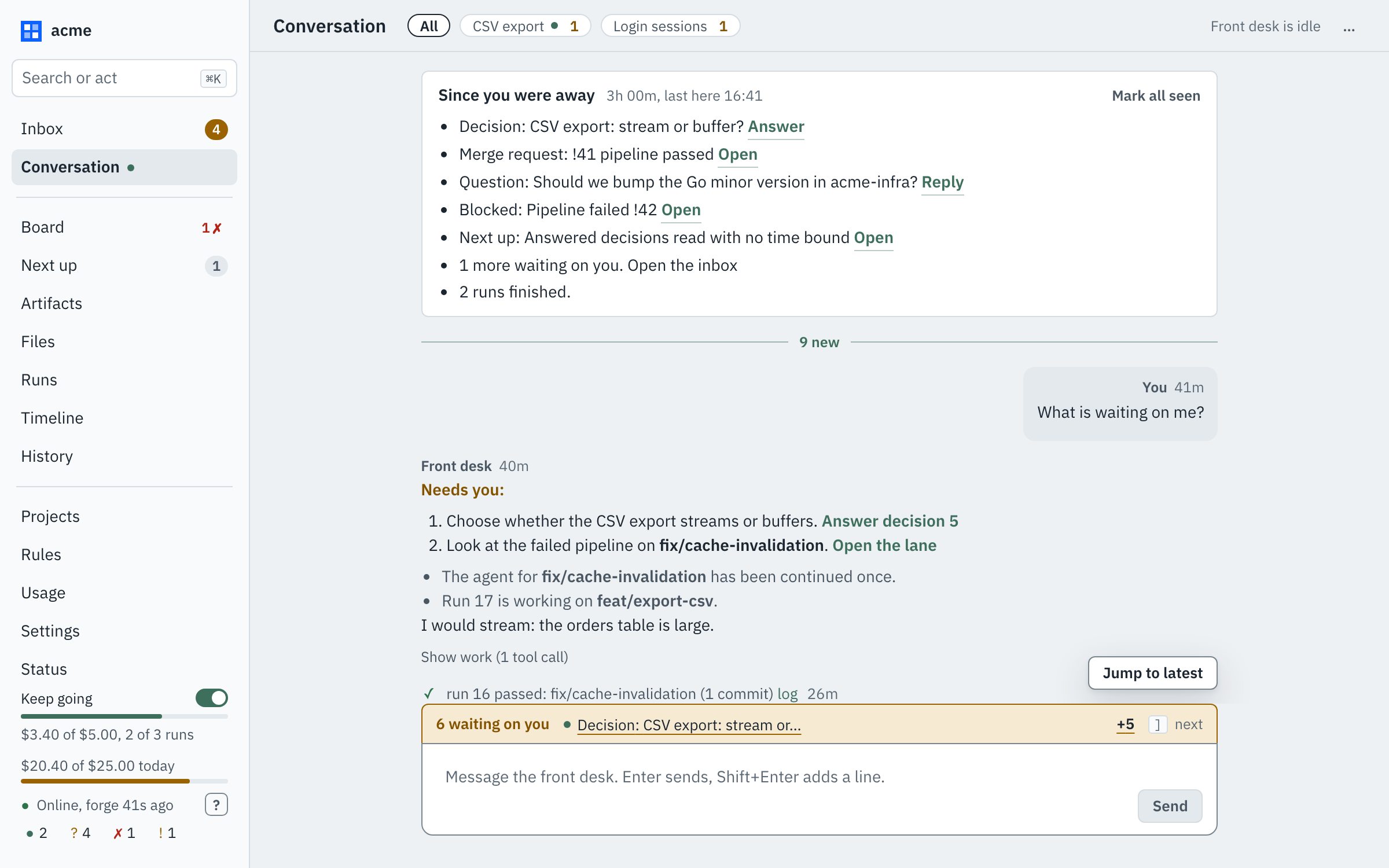
Sample data from a stub daemon, not my repos. A tool that ships with Shepherd takes these shots against made-up “acme” lanes.
One conversation, one design system
The old UI grew a page at a time, and it showed. Each page had its own spacing, its own idea of a card, its own way of saying “this needs you”. So I stopped adding pages and built one design system first: tokens for colour, spacing and type, a shell, and a small set of shared parts that every page is now made from.
The shell is plain on purpose. A sidebar on the left, with live counts at the bottom: what is running, what is waiting on you, what is broken, what needs routing. They are always there, whatever page I’m on. The main body is for reading. Side panels are for answering. And the divider between them is draggable, because how much room an answer deserves depends on the answer.
The reason I care: I shouldn’t have to open a page to find out whether I need to open a page.
The same shell now holds the rest of the console. On the Board, a lane opens beside the list as a panel, or as a page of its own, with tabs for its changes, artifacts, conversation, runs and files. The file browser reads a lane’s worktree or any ref in its repo, read-only, so I can look without opening an IDE.
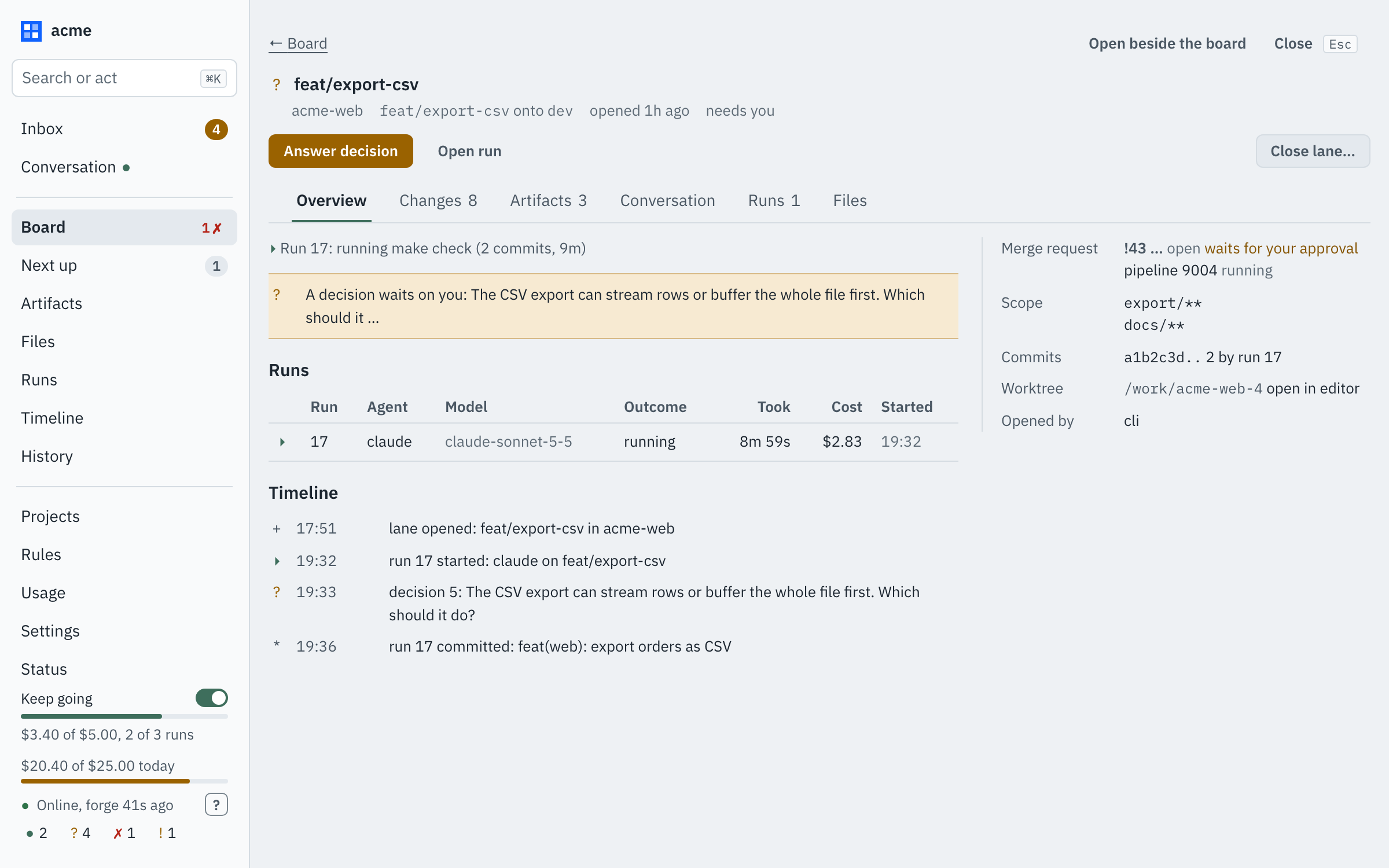
Also sample data: the “acme” lane in the stub daemon. Artifacts are the plans and files agents write, kept local or committed, as I choose.
”Needs you:” is a format, not a mood
The front desk used to write me paragraphs. They were fine. They were also paragraphs, and at 4pm with six lanes open I was skimming them for the one sentence that mattered.
Now a desk message opens one of two ways. Either “Nothing needs you.” Or “Needs you:” followed by a numbered list, each item one line with a link that opens the decision, the merge request or the lane. Under that, in a quieter weight, the rest of what happened. The tool calls behind it are folded under Show work, one click away if I want to check the desk’s homework and out of the way if I don’t.
I wanted the shape of the message to carry the news. If the first word is “Nothing”, I can go back to what I was doing without reading another character.
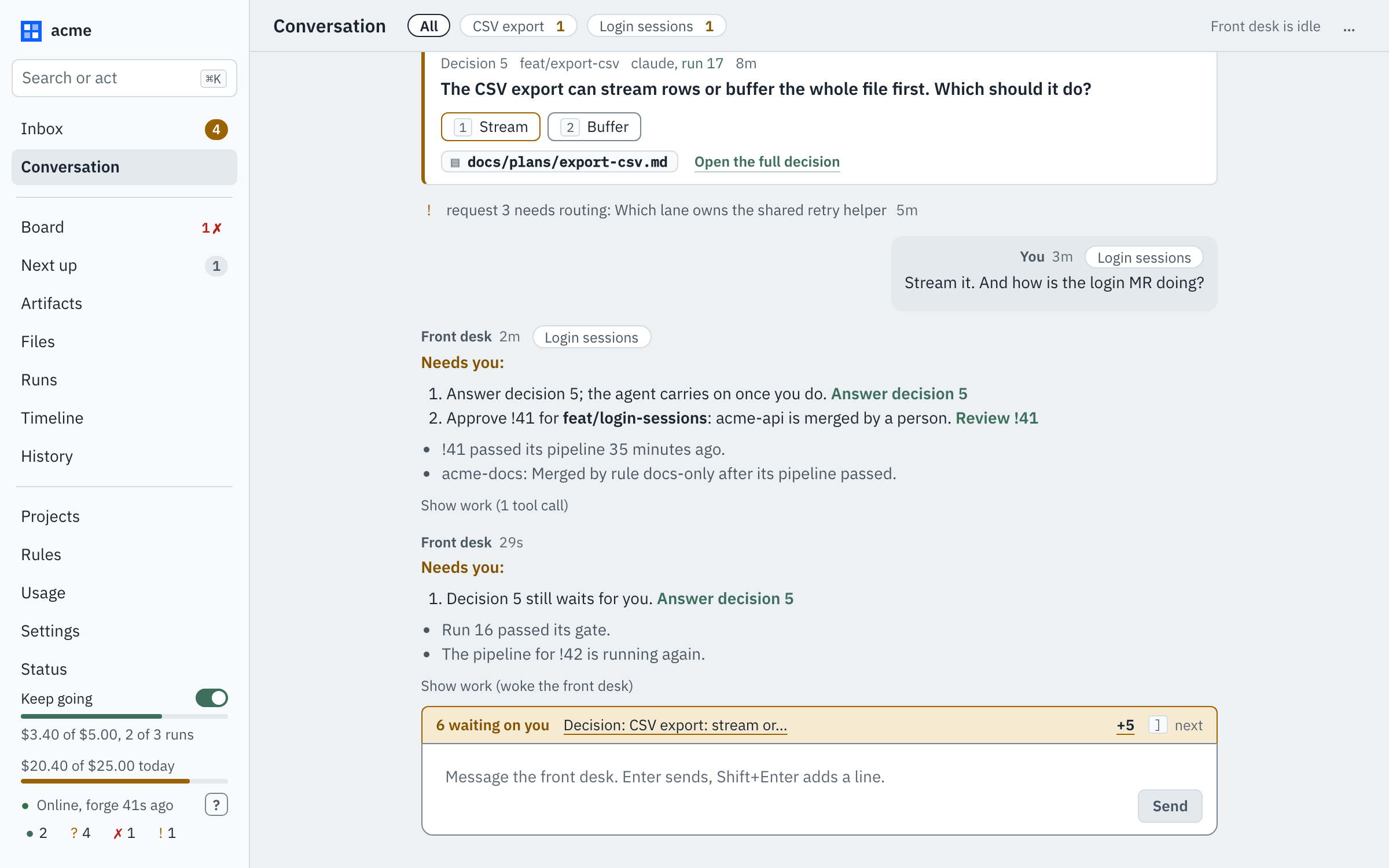
And when I’ve actually been away, the top of the thread now says so. “Since you were away” lists, in one box, what changed since I last looked: decisions waiting, a merge request whose pipeline passed, a pipeline that failed, a request that needs routing, runs that finished. Each has a link, and a “Mark all seen” clears them. It’s the lunch-break question answered before I’ve asked it.
A decision gets the whole screen
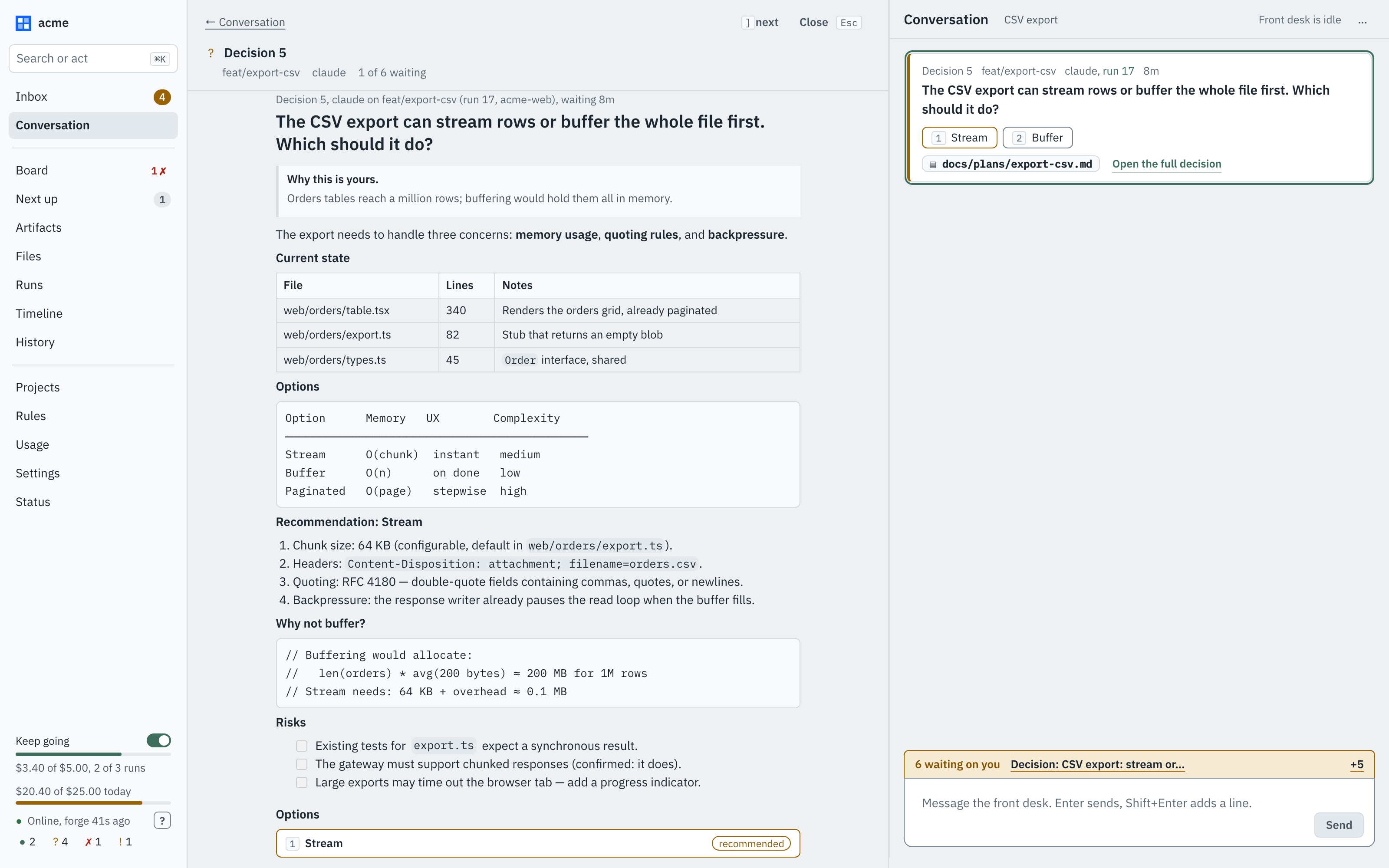
Some decisions are one line. “Stream or buffer?” and a click.
Others come with a plan, a comparison table and a recommendation, and squeezing those into a card in a thread was the one place the old UI actively fought me. Now a decision opens full-width, in the main body where I read, and the conversation moves beside it, where I answer. I can read the whole argument, then pick an option or type a reply, without losing my place in either.
Restarts that finish what they interrupted
This one is not visible in a screenshot, which is rather the point.
Upgrading a daemon that is running agents is awkward. Restart it and you cut work off mid-run. So a restart now drains: it stops handing out new work, waits for what is running, comes back on its own, and continues the runs it cut off rather than leaving them for me to find. A run I stopped by hand stays stopped, because a restart shouldn’t overrule me.
I wanted upgrading a busy daemon to be boring.
Keep going, and a waiting list that tells the truth
The same beta carries two things that help the “come back and know” idea from the other side.
Keep-going mode lets the front desk carry on with what I’ve already approved. When something happens, it may start the next approved Next-up item, continue an approved step or follow up a failed pipeline, instead of reporting and waiting. The limits are enforced by the daemon, not by asking the model nicely: a spend cap, concurrent runs, idle time, end of day, starts per lane per day. It turns itself off when one is reached and records why. It never answers a decision, approves, merges, tags or deploys, and only I can turn it on.
“Waiting on you” counts more of what waits. Blocked lanes, scope widenings I’ve approved but the lane doesn’t cover yet, and questions the desk has asked me now all show there, so the counter is closer to the real number.
There’s also an Upgrade button on the update notice, which downloads the release, checks it against its checksums and restarts onto it once no agent is running.
Try it
Binaries for Linux, macOS and Windows are on the release page: github.com/ubixsys/ubixshepherd, with the install notes and a changelog that lists every interface change. Run shepherd web for the console. Point it at a repo, open a lane or two, walk away, and come back.
What is rough
It is a beta, and I’d rather tell you where than have you find it.
- Keep-going does not start work by itself yet. With the mode on, the desk acts on events within the limits, but nothing wakes it to go looking for work.
- The AI review row in the merge request panel is a placeholder. It shows “unreviewed” every time until a data feed lands.
- macOS and Linux are what I test. Windows builds and is untested.
- Interfaces can still change. Each change is listed in the changelog.
If something breaks, or the first line of a message ever fails to tell you what you needed to know, that’s the bug I most want to hear about. Source and issues are at github.com/ubixsys/ubixshepherd.